
DGX Spark and Mac Mini for Local PyTorch Development
First Impressions and Benchmarks
The DGX Spark for local LLM inferencing and fine-tuning was a pretty popular discussion topic recently. I got to play with one myself, primarily working with and on LLMs in PyTorch, and collected some benchmarks and takeaways.
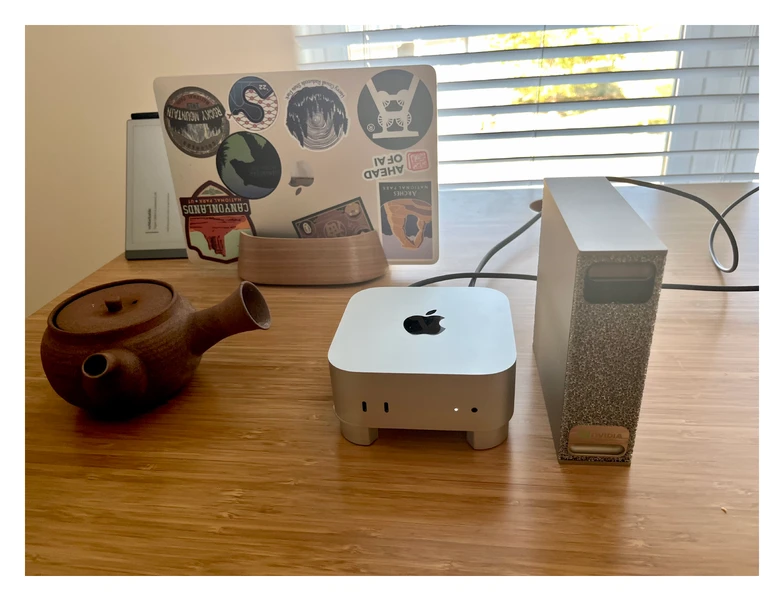
The Usual Use Case: Local Inference
Most people use the DGX Spark for local inference with tools like Ollama. That’s also what I did previously on my Mac Mini.
The DGX feels similar here but with one major difference: it has 128 GB of VRAM, which makes it possible to run larger models beyond the gpt-oss-20B model that I typically use.
For an apples-to-apples comparison though, in Ollama with optimized mxfp4 precision (for MoE models), the DGX Spark and Mac Mini M4 Pro achieve roughly 45 tok/sec when running gpt-oss-20B.
My benchmarks below are more focused on PyTorch, but if you are curious about the Ollama use case, this blog post by LMSYS has more details.
That said, what’s more interesting to me is using it as a prototyping and development machine for my pure PyTorch projects.
Below are several benchmark comparisons with my Mac Mini, as well as H100 and A100 cards I typically use via cloud providers.
1. Inference with a 0.6B Model Implemented from Scratch
In this section, I am comparing the different machines on a small 0.6B LLM model I implemented from scratch in pure PyTorch. This is a model I currently use in my Build A Reasoning Model (From Scratch) book.
In particular, I ran this 0.6 B parameter model for generating answers for simple prompts both with and without a KV-cache, and the results are shown below.
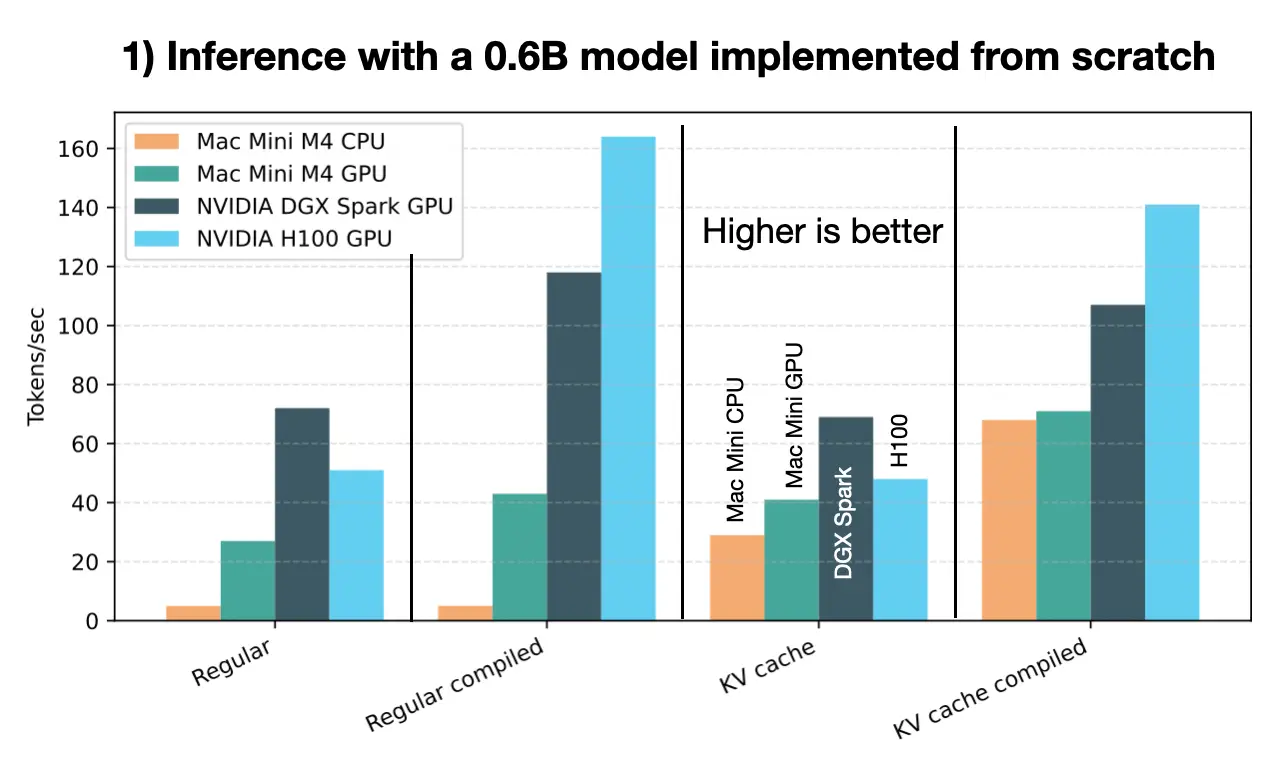
Note: All experiments were run in PyTorch 2.9. The InductorErrors I encountered when running compiled model on the Mac GPU (“mps” backend in PyTorch) are now resolved in 2.9.
The DGX Spark vastly outperforms the Mac Mini M4 Pro and is roughly on par with the 6-times more expensive H100 data center GPU, which is impressive.
Unfortunately, I couldn’t run the compiled versions on the Mac due to PyTorch MPS limitations. MPS is improving but still not on par with CUDA.
Side note: By the way, this is a relatively small model, and the KV cache is dynamic and allocated at runtime to further reduce memory. This means the KV cache grows with the response length, instead of using a pre-allocated array, which is more optimal for the GPU and compilation. I implemented it in this dynamic way on purpose to reduce memory requirements, which is often the main bottleneck for most readers. This is why you may see oddities in the plot, like that the KV-cache version is slightly slower on the GPU than the non-KV-cache version. Here, the prompt is short enough that brute-forcing everything on the GPU is not a big deal (but you can see that the Mac Mini CPU benefits a lot from the KV cache).
For longer prompts, the KV-cache version is the clear winner in all cases.
You can find the code to reproduce these results here: https://github.com/rasbt/reasoning-from-scratch/tree/main/ch02/01_main-chapter-code
2. Evaluating a 0.6B Base vs Reasoning Model on MATH-500
This benchmark extends the previous one and compares a base model and a reasoning model across 500 MATH-500 prompts that produce answers of vastly different lengths. (I am using the uncompiled KV-cache version here.)
The following plots show results for running the evaluation sequentially (one prompt at a time) or in batches (with 128 prompts at a time).
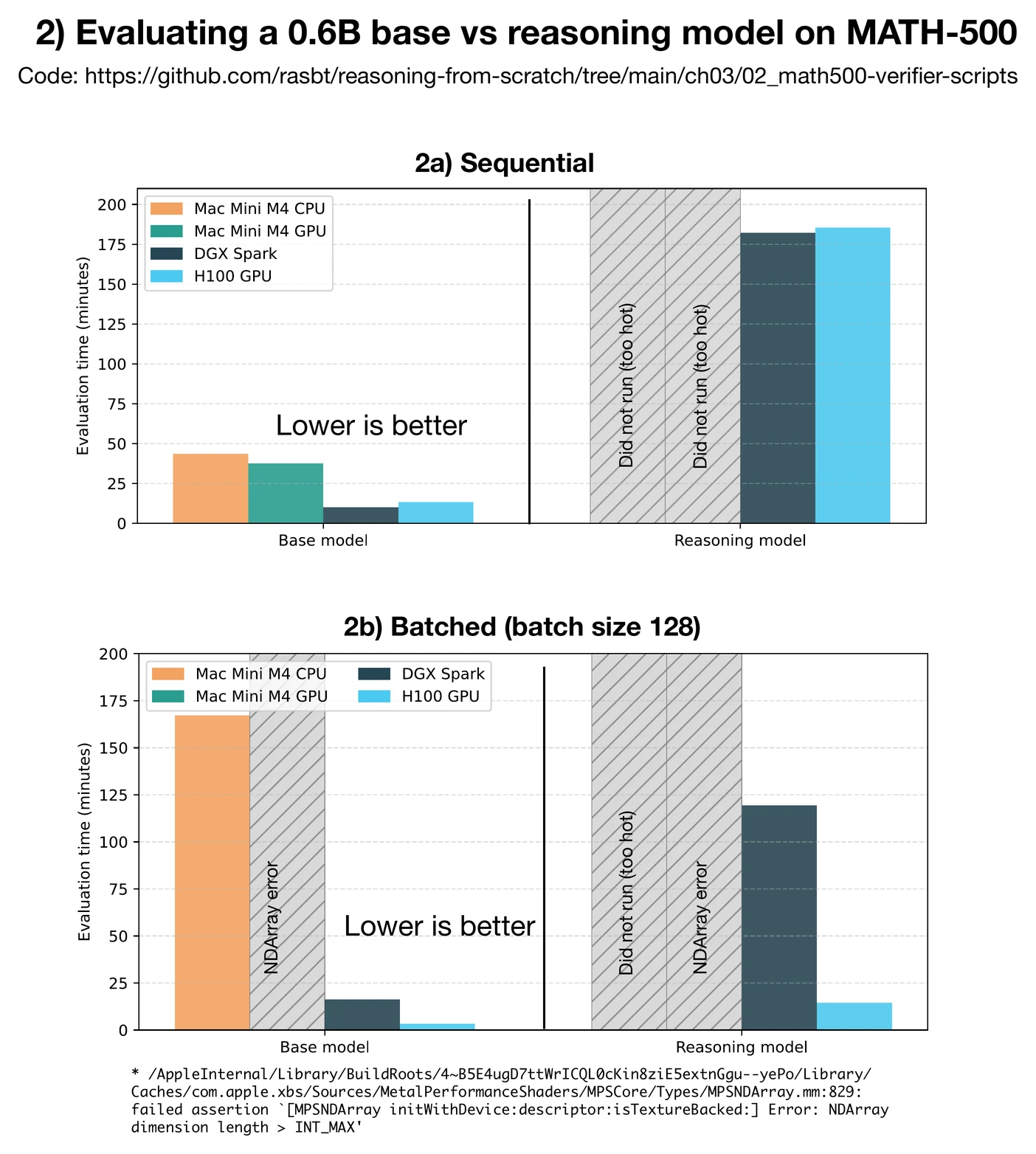
In general, the reasoning model is much slower than the base model as it generates much longer responses. The average response length of the base model is 96.74 tokens whereas the average response length of the reasoning model is 1361.21 tokens.
As we can see in Figure 3, in the sequential runs (2a), the DGX Spark even outperformed the 6× more expensive H100, which is again impressive. However, when it comes to batched runs, the H100 is the clear winner. This is presumably because of its much better memory bandwidth.
Note that I didn’t run the reasoning model on my Mac Mini because it runs very hot (over 100 °C according to the stats tool I am using, which is the boiling point of water). And I didn’t want to run it that hot for >3 hours straight as I am worried about damaging it, since it is my main work machine.
The DGX Spark (loaned by NVIDIA) runs relatively hot as well, but I assume it is designed for workloads like this. (Plus, I don’t have any important data on it.)
You can find the code to reproduce these experiments here: https://github.com/rasbt/reasoning-from-scratch/tree/main/ch03/02_math500-verifier-scripts
3. Training / Fine-Tuning a 355M Model
Previously, we have seen that the DGX Spark is great for single-sequence generation, but less ideal for large-batch inference compared to an H100. How about small training and post-training runs?
I ran short pre-training (3a), supervised finetuning (3b), and DPO preference-tuning runs to compare the different system, as shown in the figure below.
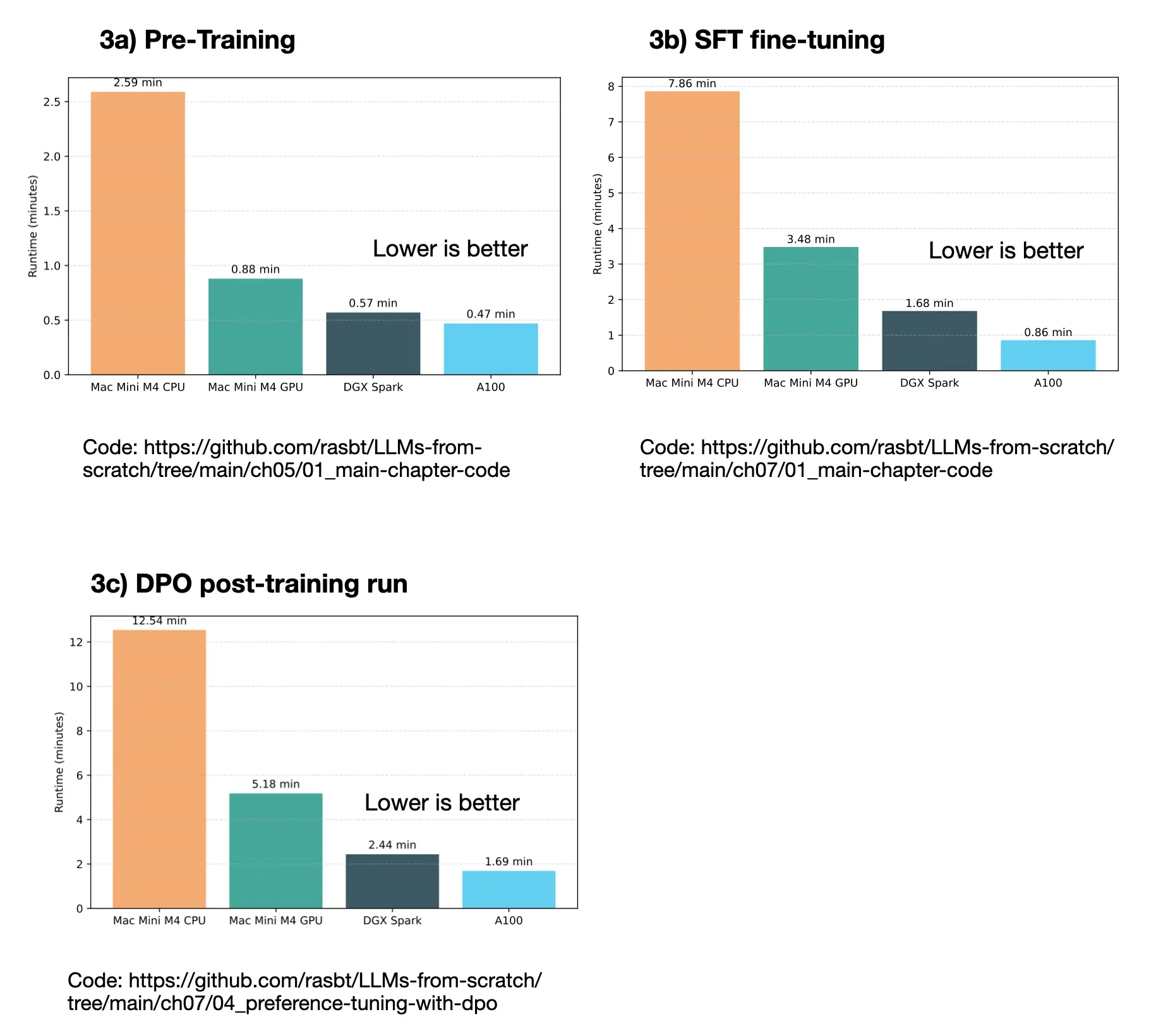
Note that I ran these experiments on an A100 not on an H100 as I didn’t have an H100 available at the time.
Across all three categories, the DGX Spark and A100 were both significantly faster than the Mac Mini.
These are very short runs, but they show that the DGX could handle smaller-scale training and fine-tuning tasks efficiently.
Links to the code to reproduce these runs can be found below:
- Pre-training (3a): https://github.com/rasbt/LLMs-from-scratch/tree/main/ch05/01_main-chapter-code (but change from 127M to 355M model.)
- SFT fine-tuning (3b): https://github.com/rasbt/LLMs-from-scratch/tree/main/ch07/01_main-chapter-code
- DPO fine-tuning (3c): https://github.com/rasbt/LLMs-from-scratch/tree/main/ch07/04_preference-tuning-with-dpo
Conclusion
Overall, the DGX Spark seems to be a neat little workstation that can sit quietly next to a Mac Mini. It has a similarly small form factor, but with more GPU memory and of course (and importantly!) CUDA support.
I previously had a Lambda workstation with 4 GTX 1080Ti GPUs in 2018. I needed the machine for my research, but the noise and heat in my office was intolerable, which is why I had to eventually move the machine to a dedicated server room at UW-Madison. After that, I didn’t consider buying another GPU workstation but solely relied on cloud GPUs. (I would perhaps only consider it again if I moved into a house with a big basement and a walled-off spare room.) The DGX Spark, in contrast, is definitely quiet enough for office use. Even under full load it’s barely audible.
It also ships with software that makes remote use seamless and you can connect directly from a Mac without extra peripherals or SSH tunneling. That’s a huge plus for quick experiments throughout the day.
But, of course, it’s not a replacement for A100 or H100 GPUs when it comes to large-scale training.
I see it more as a development and prototyping system, which lets me offload experiments without overheating my Mac. I consider it as an in-between machine that I can use for smaller runs, and testing models in CUDA, before running them on cloud GPUs.
In short: If you don’t expect miracles or full A100/H100-level performance, the DGX Spark is a nice machine for local inference and small-scale fine-tuning at home.
If you read the book and have a few minutes to spare, I'd really appreciate a brief review. It helps us authors a lot!
Your support means a great deal! Thank you!